
- Why You Should Switch to an Ultrawide Gaming Monitor
- What Sets These Ultrawide Gaming Monitors Apart
- Top Mistakes Gamers Make When Choosing an Ultrawide Gaming Monitor
- Red Flags to Watch Out for When Choosing an Ultrawide Gaming Monitor
- At a Glance: Ultrawide Gaming Monitors
- LG 45GX950A-B
- ASUS ROG Swift OLED PG34WCDM
- Samsung Odyssey OLED G9 G93SC
- Alienware AW3423DWF
- How to Choose the Best Ultrawide Gaming Monitor for High-Res Setups
If you’ve already decided that you want an ultrawide monitor for gaming, then the question isn’t whether or not to buy one, but what trade-offs you’re willing to make.
This can be hard to hear, but some monitors will emphasize raw speed while staying at 3440 x 1440. Others might give you enormous amounts of screen space but push your GPU well beyond its limits. Certain ultrawide monitors strive to be good all-rounders but don’t always succeed in every aspect.
For gamers looking for both immersion and powerful panel performance, this category can quickly become very complex. You have to consider factors like panel technology, the refresh rate, aspect ratio, curve radius, desk depth, and HDR quality, not to mention whether your GPU can realistically drive it.
This guide helps you make that decision by focusing on ultrawide gaming monitors that offer advantages like genuinely high resolution, superior panel quality, or enough screen real estate to justify the footprint.
Why You Should Switch to an Ultrawide Gaming Monitor
Ultrawide monitors aren’t simply a larger version of standard displays. The right model can improve the look and feel of games, as well as how your desk functions and how efficiently you can use your setup between matches.
Solid reasons to switch include:
Wider Field of View in Supported Games
Many modern titles, like Red Dead Redemption 2 and Death Stranding, support 21:9 or 32:9 aspect ratios, allowing you to see more of the environment horizontally than you would on a regular 16:9 display.
This can make movement feel much more natural in open-world titles, as well as in racing games and shooters.
More Usable Space in Strategy and Sim Games
Even if a game isn’t specifically designed for ultrawide monitors, it will benefit from the extra horizontal room if it’s from a genre that prizes busy interfaces. This can include strategy games, management sims, and MMOS. Maps, inventory systems, and multiple toolbars won’t be competing for space, allowing you to focus on core gameplay.
Better Multitasking on One Screen
Even when a game isn’t running, ultrawide monitors readily support keeping Discord, Twitch chat, and multiple browser tabs open beside your main window without requiring a second monitor. This is cleaner and more efficient than using a second monitor.
What Sets These Ultrawide Gaming Monitors Apart
While there’s no shortage of ultrawide gaming monitors on the market today, it’s relatively easy to create a shortlist once you look past the headline specs.
For this guide, I’ve focused on models that offer a genuine step up for gamers who truly care about immersion and picture quality. That means prioritizing higher resolutions, fast refresh rates, strong panel technology over the cheapest screens with a curved chassis and basic RGB lighting.
I also handpicked ultrawide monitors from brands with a well-established track record for manufacturing quality gaming displays, as well as good firmware support and panel tuning.
While I feel that LG’s offering is strongest overall, each pick brings something different to the table, so may solve different high-end gaming needs.
Top Mistakes Gamers Make When Choosing an Ultrawide Gaming Monitor
Buying for Size Instead of Pixel Density
A huge screen with a modest resolution can look softer than expected. Read through the official specs for your chosen ultrawide monitor and look for independent benchmarks to make sure you’re not blinded by marketing claims about size alone, which in itself is no guarantee of clarity.
Ignoring GPU Reality
Driving 5120 x 2160 at high settings is going to be demanding on your gaming setup. Switching to an ultrawide monitor can be a smart move, but always check first that your ambition matches the real-world capabilities of your chosen graphics card during play.
Underestimating Desk Space
A 45-inch or 49-inch ultrawide can absolutely dominate a shallow desk, leaving little room for other peripherals like your keyboard, mouse, and speakers. Double-check the dimensions on the manufacturer’s website and measure them carefully against the available space.
Assuming Every Game Supports Ultrawide Perfectly
As we’ve learned, many modern titles support 21:9 and 32:9 aspect ratios, so will play nicely with ultrawide monitors. However, certain game aspects, like menus, HUDs, cutscenes, and older titles, may still have issues or revert to black bars.
Red Flags to Watch Out for When Choosing an Ultrawide Gaming Monitor
Vague HDR Marketing
While marketing materials for many ultrawide monitors advertise that they support HDR, there’s a difference between a model that can simply accept an HDR signal and one that delivers meaningful HDR performance.
If a brand doesn’t clearly state its ultrawide monitor’s peak brightness, local dimming capability, or recognized certification, such as DisplayHDR, then you should amend your expectations accordingly.
Old/Limited Connectivity
A top-tier ultrawide monitor should offer modern ports to match the latest hardware. If HDMI 2.1, DisplayPort bandwidth, USB-C, or high-refresh support over the included inputs is missing or restricted, you may be paying a higher price for a unit with limited connectivity.
“Gaming Monitor” Branding Without VRR Support
At this tier, a true ultrawide gaming monitor should support adaptive sync properly, whether through AMD FreeSync, NVIDIA G-SYNC compatibility, or both. Using a monitor that doesn’t reliably support VRR is much more likely to lead to tearing, stutter, and a less consistent experience when frame rates fluctuate. VRR issues can sometimes be resolved by applying firmware updates, but check for independent confirmation of this before buying.
Flimsy Stand Design
A large ultrawide monitor can place real demands on its stand. Check independent reviews carefully for any mentions of wobble, difficulty with adjusting height, weak tilt control, or any other ergonomic issues to make sure your daily usability doesn’t suffer, even if the panel itself has enthusiast-grade specs.
At a Glance: Ultrawide Gaming Monitors
| Monitor | Size | Resolution | Refresh Rate | Connectivity | Approx. MSRP |
| LG 45GX950A-B | 45-inch | 5120 x 2160 | 165Hz / 330Hz Dual Mode | DisplayPort 2.1, HDMI 2.1, USB-C, USB Hub | $1,999 |
| ASUS ROG Swift OLED PG34WCDM | 34-inch | 3440 x 1440 | 240Hz | DisplayPort 1.4 DSC, HDMI 2.1, USB-C, USB Hub | $1,299 |
| Samsung Odyssey OLED G9 G93SC | 49-inch | 5120 x 1440 | 240Hz | DisplayPort 1.4, HDMI 2.1, USB Hub | $1,199 |
| Alienware AW3423DWF | 34-inch | 3440 x 1440 | 165Hz | DisplayPort 1.4, HDMI 2.0, USB Hub | $799 |
The prices listed above were true at the time of writing for new models ordered directly from the manufacturer in the USA, but may vary depending on region and retailer promotions.
LG 45GX950A-B
- True 5120 x 2160 5K2K ultrawide resolution
- OLED contrast with 0.03ms response time
- Dual Mode: 165Hz high-res or 330Hz lower-res speed mode
- High-end pricing
- Needs a powerful GPU at native resolution
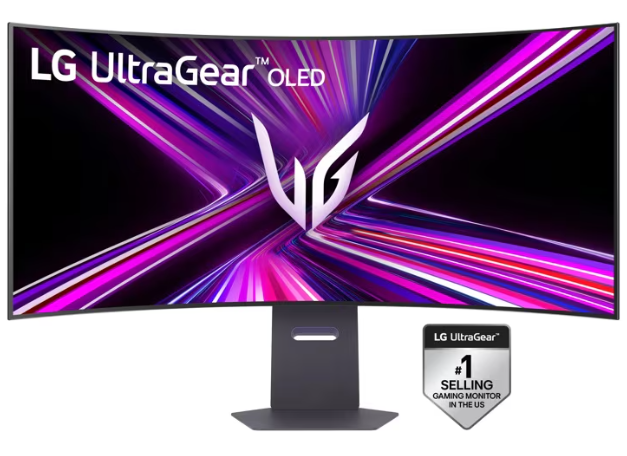
The LG UltraGear 45GX950A-B is one of the most interesting monitors on the market right now because it solves a common ultrawide problem for gamers: many giant displays feel immersive without offering a particularly sharp picture.
LG instead uses a 45-inch 21:9 OLED panel at 5120 x 2160. This provides a lot more pixel density than older large-format ultrawide monitors, which makes for better text, HUD elements, and open-world scenery.
The manufacturer rates the panel at 165Hz, with a Dual Mode that can switch to WFHD 330Hz. This can be useful for players who prize speed over resolution, for instance, when playing competitive titles like Fortnite.
Users also benefit from a 0.03ms response time, G-SYNC compatibility, FreeSync Premium Pro support, DisplayPort 2.1, and USB-C with power delivery on certain regional listings.
The 800R curve is aggressive, but logical for an ultrawide monitor of this size (45″). It keeps the edges usable rather than distant.
The 45GX950A-B’s price tag means it’s not something to purchase on a whim, but for dedicated gaming enthusiasts. Its native 5K2K gaming can punish mid-range GPUs. But with the right graphics cards, it’s the most complete option in this roundup for players who want a single display for multitasking, cinematic gaming, high-resolution ultrawide clarity.
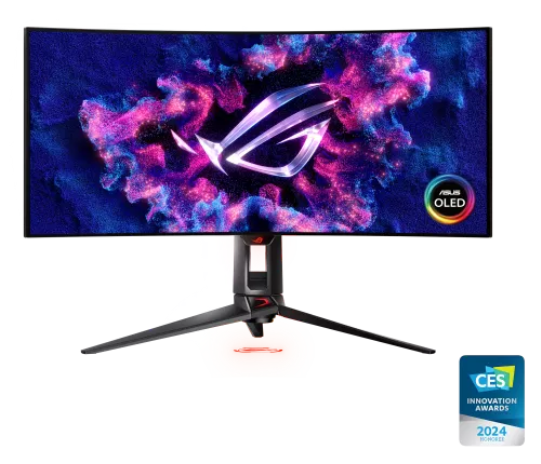
ASUS ROG Swift OLED PG34WCDM
- Impressive refresh rate (240 Hz)
- Fast OLED response with strong motion clarity
- Manageable 34-inch footprint
- Lower resolution compared to other ultrawide models
- Expensive pricing for 1440p ultrawide
- Smaller immersion factor than 45″/49″ competitors
ASUS’ offering doesn’t chase raw pixel count in the same way as premium ultrawide monitors from companies like LG. Instead, the PG34WCDM focuses more on speed and balance.
This results in a 34-inch curved OLED panel, with a 3440 x 1440 resolution, 240Hz refresh rate, and 0.03ms GTG response time. The monitor also sports an HDMI 2.1 port, a DisplayPort 1.4 DSC, USB-C with power delivery, and gaming extras such as Extreme Low Motion Blur (ELMB) features and utility overlays.
The resolution is easier to drive relative to flagship-tier ultrawide monitors, meaning that gamers can get respectable frame rates without deploying top-tier graphics cards.
The PG34WCDM’s size also means that it’s easy to position and is likely to fit more snugly on more desks, given it doesn’t have the same ‘command center’ footprint of larger ultrawides in this roundup.
Of course, this works both ways: for the listed price, you’re effectively paying a premium for a monitor that isn’t as immersive as, say, a 45-inch model and lacks 4K or 5K2K resolution.
Still, for players who are happy to use the 1440p ultrawide format, the monitor offers fast gaming with OLED contrast, strong motion handling, and a sane form factor.
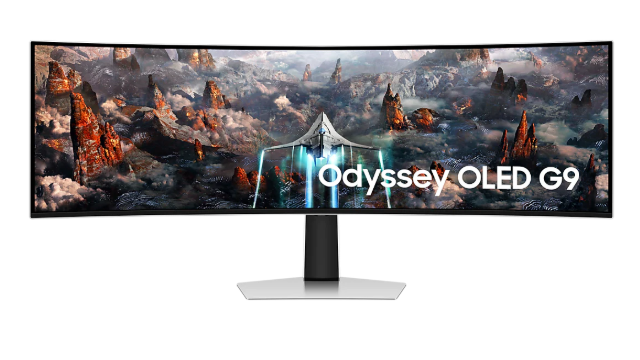
Samsung Odyssey OLED G9 G93SC
- Huge 49-inch 32:9 format
- 240Hz OLED panel
- Ideal for sims and multitasking
- 5120 x 1440 is wide but not as sharp as 5K2K rivals
- Very large desk footprint
- Certain games handle 32:9 better than others
Given its giant size, the G9 G93SC’s display often feels more like a cockpit than a gaming monitor.
The 49-inch 32:9 OLED panel runs at 5120 x 1440 with 240Hz refresh rate and 0.03ms response time. To put this into perspective, the resolution is effectively two 27-inch 1440p displays fused together.
That makes the monitor a good fit for flight sims (hence the ‘cockpit’ comparison), as well as racing games, and strategy titles. It’s also good for productivity multitasking, given it can handle gaming center-screen while apps are kept open on either side.
The OLED panel also delivers the black levels and response speed most gamers would expect, and the 240Hz refresh rate keeps play smooth. However, it falls down when it comes to vertical resolution:
Samsung’s choice of a 1440-pixel vertical resolution for this monitor can feel less luxurious for desktop work compared with newer 5K2K options that offer more vertical space and sharper text.
It’s also enormous physically, meaning players may need to have a very large and sturdy desk to use it effectively.
If you can live with this and want a wider, more dramatic gaming experience, then Samsung is a solid option. If you want sharper image quality and more conventional usability, 21:9 models are a better choice.
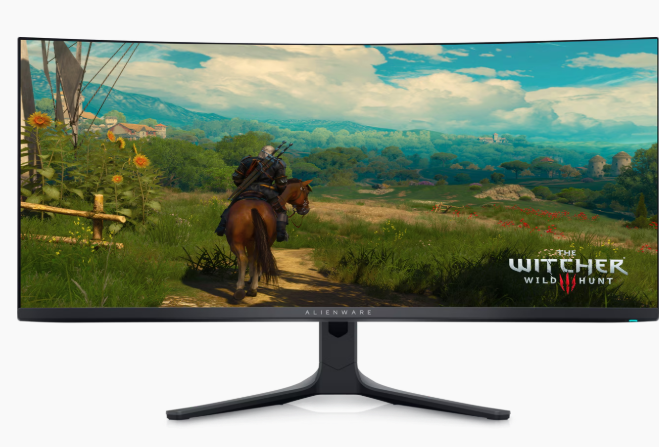
Alienware AW3423DWF
- Superior QD-OLED image quality
- Good value for money vs. high-end rivals
- Popular 34-in format
- Refresh rate (165 Hz) is weak vs. competitors
- Relatively low resolution
- Older design generation
This Alienware monitor has become something of a modern classic. It uses a 34.18-inch QD-OLED panel with 3440 x 1440 resolution, 165Hz refresh rate, FreeSync Premium Pro support, and up to 1000 nits peak brightness in HDR claims.
The QD-OLED aspect is worth exploring, as it combines OLED contrast with respectable color vibrancy. This is good news for improving the appearance of games, particularly those with neon lighting, HDR highlights, and dark scenes like Cyberpunk 2077.
Admittedly, newer ultrawide monitors have surpassed it in terms of raw specs, but the AW3423DWF’s price has dropped significantly since its launch, making it the most affordable premium ultrawide monitor in this roundup.
Players may not benefit from the kind of sharper experience they’d get with, say, LG’s 5K2K panel and the faster 240Hz tier now common elsewhere, but if you don’t need such flagship features, then Alienware’s modern classic is a smart buy.
How to Choose the Best Ultrawide Gaming Monitor for High-Res Setups
As we mentioned at the start of this guide, choosing the best ultrawide gaming monitor is frequently an exercise in compromise.
For the best overall package of immersion, resolution, and gaming versatility, I stand by my original recommendation of LG 45GX950A-B.
However, if speed and manageable size matter to you more than extreme resolution, then the ASUS PG34WCDM may be a better choice. For maximum width for sims, multitasking, or spectacle, the Samsung G93SC is a strong option.
Choose the Alienware AW3423DWF if your budget doesn’t extend to more expensive ultrawide monitors, but you still want to benefit from elite OLED gaming.
Above all, avoid the mistake of buying a monitor purely due to its advertised size or refresh rate. For high-res ultrawide gaming, the best purchase will always be a monitor that matches your GPU, desk, and play style.

- Best Ultrawide Gaming Monitors for High-Res Setups - June 8, 2026
- Is Terraria Cross Platform? - June 16, 2022
- Ganryu 2 PS4 Review – A Trip Back to The ’90s - May 15, 2022